


*Last Updated: December 14, 2025*
The Problem
Common repetitive work when using Antigravity IDE:
Day 1:

Developer: Create a React component

AI: Sure, using class component

Developer: No, we only use function components

AI: Understood, corrected

Day 2 (new conversation):

Developer: Create another React component

AI: Sure, using class component

Developer: (explaining again...) We only use function components

Day 3 (reopen project):

Developer: Create login component

AI: Which framework should I use?

Developer: (third time...) React, function component, TypeScript
Every time you start a new conversation or restart the IDE, you have to tell the AI again:
- Code style preferences
- Naming conventions
- Testing requirements
- Documentation format
These rules should be part of the project, not something you explain every time.
The Solution
**Antigravity provides two official mechanisms** to make AI automatically follow your development standards:
1. Rules
- Like “system prompts”
- Always active, no need to remind every time
- Define AI’s behavior guidelines
2. Workflows
- Like “quick actions”
- Trigger on demand, execute complex tasks
- Standardize repetitive work
Get Started: Experience Rules & Workflows with agy-starter
Instead of starting with theory, let’s dive right in. We’ve prepared a complete example project `agy-starter` for hands-on learning.
Repo: https://github.com/AgentWorkshop/agy-starter.git
Step 1: Clone the Project
git clone https://github.com/AgentWorkshop/agy-starter.git

cd agy-starter
Open this folder in Antigravity IDE (File → Open Folder → select `agy-starter/`)
💡 What are Rules?
After opening the project, Antigravity automatically reads the `.antigravity/rules.md` file. **Rules are AI’s behavior guidelines**, like a constitution that’s always in effect:
**Always active**: No need to repeat instructions every conversation
**Auto-applied**: AI automatically loads when opening the project
**Team-shared**: After committing to git, all members follow the same standards
**Example:** Open `.antigravity/rules.md` to see complete writing standards. Try asking AI to create a new article - it will automatically follow these rules.
Step 2: Explore Project Structure
View the project file tree:
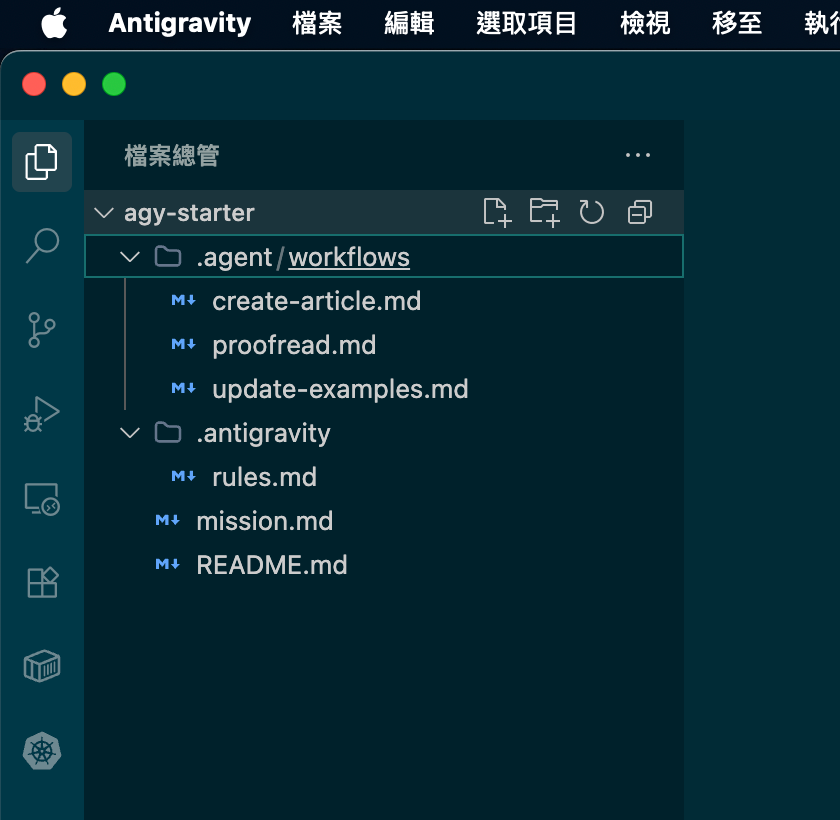
*Image: agy-starter project structure - actual file tree in Antigravity IDE*
💡 File Location Explanation
Antigravity projects have two official directories:
`.antigravity/rules.md` - Project Standards
AI’s behavior guidelines
Auto-loaded, always active
`.agent/workflows/` - Workflows
Reusable task templates
Triggered with `/commands`
**Tip:** You can also set global configuration (`~/.gemini/GEMINI.md`) for personal preferences across all projects.
Step 3: Try Your First Workflow
In the Antigravity conversation, type: `/`
You’ll see the list of available workflows:
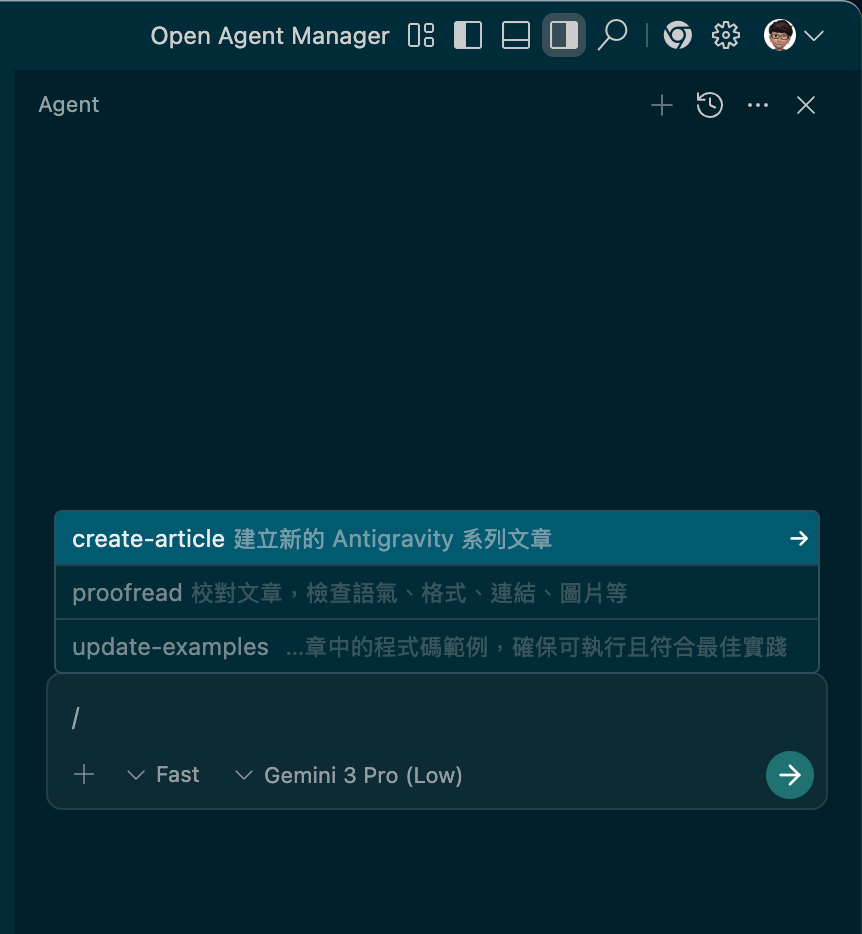
*Image: Triggering a Workflow - interface after typing /*
Select `/create` to have AI create a new article.
💡 What are Workflows?
**Workflows are reusable task templates**, like scripts:
**Standardized process**: Ensures consistent steps every time
**Time-saving**: No need to describe steps in detail each time
**Team collaboration**: Everyone completes tasks the same way
**Workflows included in agy-starter:**
`/create` - Create new article (with template and image directory)
`/update` - Update code examples in articles
`/proof` - Proofread article (check format, links, tone)
Open `.agent/workflows/create-article.md` to see the workflow structure: includes step instructions, examples, and expected results.
Step 4: Customize Your Rules
Now that you understand how Rules work, try editing `.antigravity/rules.md` to match your project needs.
💡 Writing Good Rules
**❌ Bad Examples (too abstract):**
- Write good code

- Follow best practices
**✅ Good Examples (specific and clear):**
- Use Function Components, not Class Components

- Props must define TypeScript interface

- Every component must have a corresponding .test.tsx file
**Editing Steps:**
1. Open `.antigravity/rules.md`
2. Modify standards based on your project tech stack
3. Save and reload Antigravity (or start a new conversation)
4. Test if AI follows the new rules
Step 5: Create Your First Workflow
Try creating a new workflow file in `.agent/workflows/`.
💡 Workflow Structure
Basic format:
---

description: Brief description of what this workflow does

---

## Steps

### 1. First Step

- Specific operation instructions

- Expected results

### 2. Second Step

- Specific operation instructions

- Expected results
**Example: Generate Test Files**
---

description: Generate unit tests for existing code

---

## Steps

### 1. Analyze Target File

- Read the specified code file

- Identify all exported functions

### 2. Generate Test Cases

- Create at least 3 tests for each function

- Use clear test names

### 3. Run Tests

- Automatically execute npm test

- Verify all tests pass
Save as `.agent/workflows/generate-tests.md`, then trigger it with `/generate`.
Deep Understanding
Global vs Workspace Rules
You might wonder: When should I use global Rules vs project Rules?
**Global Configuration (`~/.gemini/GEMINI.md`):**
Personal code style (applies to all projects)
Preferred naming conventions
Documentation writing habits
**Project Configuration (`.antigravity/rules.md`):**
Project-specific tech stack
Team-shared standards
Client-specific requirements
**Priority:** Workspace Rules > Global Rules (project settings take precedence)
FAQ
Q: What’s the difference between Rules and Workflows?*
A: Rules are “passive guidelines”, Workflows are “active tasks”
Q: When I reopen the project, do Rules still work?
A: Yes! Rules and Workflows are stored in project files, and AI automatically loads them every time you open the project.
Q: What if team members don’t have Antigravity?
A: These files are plain text Markdown and can be read as the project’s CONTRIBUTING.md.
## Summary
**After implementing Rules & Workflows, you’ll see:**
✅ **No more repetition** - Set once, AI remembers forever
✅ **Instant onboarding** - New team members get the same AI behavior
✅ **Consistent quality** - All code follows the same standards
✅ **Time savings** - Complex tasks become one-command operations
✅ **Knowledge transfer** - Project standards are documented and executable
Start using agy-starter and experience the power of Antigravity Rules & Workflows! 🚀
Resources
- [Google Developers Blog - Antigravity Launch] - link
- [Google Codelabs - Antigravity Tutorial] - link
- [Antigravity Workspace Template]: https://github.com/jimmyliao/antigravity-web-fullstack
- [Antigravity Codes - Workflows Guide] link
Jimmy Liao
CTO/Co-founder @ Stealth Startup
中文版本: https://memo.jimmyliao.net/p/antigravity-rules-and-workflows-ai/comments